Showing posts with label Knowledge. Show all posts

See how Lokpal Bill can curb the politicians

Saturday, 27 August 2011

Summary of All scams of India : Rs. 910603234300000/-


See howLokpal Bill can curb the politicians,
Circulate it to create awareness
 
Existing System
System Proposed by civil society
No politician or senior officer ever goes to jail despite huge evidence because Anti Corruption Branch (ACB) and CBI directly come under the government. Before starting investigation or prosecution in any case, they have to take permission from the same bosses, against whom the case has to be investigated. Lokpal at centre andLokayukta at state level will be independent bodies.ACB and CBI will be merged into these bodies. They will have power to initiate investigations and prosecution against any officer or politician without needing anyones permission. Investigation should be completed within 1 year and trial to get over in next 1 year. Within two years, the corrupt should go to jail.
No corrupt officer is dismissed from the job because Central Vigilance Commission, which is supposed to dismiss corrupt officers, is only an advisory body. Whenever it advises government to dismiss any senior corrupt officer, its advice is never implemented. Lokpal andLokayukta will have complete powers to order dismissal of a corrupt officer.CVC and all departmental vigilance will be merged intoLokpal and state vigilance will be merged into Lokayukta.
No action is taken against corrupt judges because permission is required from the Chief Justice of India to even register an FIR against corrupt judges. Lokpal &Lokayukta shall have powers to investigate and prosecute any judge without needing anyones permission.
Nowhere to go - People expose corruption but no action is taken on their complaints. Lokpal &Lokayukta will have to enquire into and hear every complaint.
There is so much corruption within CBI and vigilance departments. Their functioning is so secret that it encourages corruption within these agencies. All investigations inLokpal &Lokayukta shall be transparent. After completion of investigation, all case records shall be open to public. Complaint against any staff ofLokpal &Lokayukta shall be enquired and punishment announced within two months.
Weak and corrupt people are appointed as heads of anti-corruption agencies. Politicians will have absolutely no say in selections of Chairperson and members ofLokpal & Lokayukta. Selections will take place through a transparent and public participatory process.
Citizens face harassment in government offices. Sometimes they are forced to pay bribes. One can only complaint to senior officers. No action is taken on complaints because senior officers also get their cut. Lokpal &Lokayukta will get public grievances resolved in time bound manner, impose a penalty ofRs 250 per day of delay to be deducted from the salary of guilty officer and award that amount as compensation to the aggrieved citizen.
Nothing in law to recover ill gotten wealth. A corrupt person can come out of jail and enjoy that money. Loss caused to the government due to corruption will be recovered from all accused.
Small punishment for corruption- Punishment for corruption is minimum 6 months and maximum 7 years. Enhanced punishment - The punishment would be minimum 5 years and maximum of life imprisonment
.


 Dear All, Please go through the details carefully
& try to be part of this mission against corruption.


Things to know about AnnaHazare andLok pal Bill-:

1.Whois Anna Hazare?
An ex-army man(Unmarried). Fought 1965 Indo-Pak war.

2.What'sso special about him?
He built a villageRalegaonSiddhi inAhamad Nagar district, Maharashtra.

3.This village is a self-sustained model village. Energy is produced in the village itself from
solar power,biofuel and wind mills. In 1975, it used to be a poverty clad village.
Now it is one of the richest village in India. It has become a model for self-sustained, eco-friendly
& harmonic village.

4. This guy, AnnaHazare was awardedPadmaBhushan and is a known figure for his social activities.

5. He is supporting a cause, the amendment of a law to curb corruption in India.

6. How that can be possible?
He is advocating for a Bill, TheLok Pal Bill (The Citizen Ombudsman Bill),
that will form an autonomous authority who will make politicians (ministers),
bureaucrats (IAS/IPS) accountable for their deeds.

7. It's an entirely new thing right..?
In 1972, the bill was proposed by then Law minister Mr.Shanti Bhushan.
Since then it has been neglected by the politicians and some are trying to change the bill to suit
their theft (corruption).

8. Oh.. He is going on a hunger strike for that whole thing of passing a Bill ! How can that be
possible in such a short span of time?
The first thing he is asking for is: thegovt should come forward and announce that the bill is going
to be passed. Next, they make a joint committee to DRAFT theLOK PAL BILL.
50% government participation and 50% public participation.
Bcoz u can't trust the government entirely for making such a bill which does not suit them.

9.Whatwill happen when this bill is passed?
ALokPal will be appointed at the centre. He will have an autonomous charge, say like the
Election Commission of India. In each and every state,Lokayukta will be appointed.
The job is to bring all alleged party to trial in case of corruptions within 1 year.
Within 2 years, the guilty will be punished.
Pass this on n showur support..

Spread it like fire; Our Nation needs us...
Please Contribute... This is not just a forward,
its the future of our Nation.
Continue Reading | comments

How To Abort The Mistaken Shutdown Operation In Windows

Saturday, 20 August 2011

You’ve mistakenly pressed shutdown button on your pc or you mistakenly choose restart. In such condition, how to abort the current shutdown operation?

we’ll create an emergency abort shutdown icon. Then you’ll just have to double click on it to abort shutdown.

To abort shutdown, immediately after initiating shutdown we will have to use "shutdown-a" ...let's see how

STEPS:-

1) Right click on the blank area of your desktop and choose New>Shortcut

2) In input box of “type the location of the item” copy or type the following command as shown in image below:

 3) Give it your own shortcut name. (I named it Emergency)


click on finish button

4)  You’ll have your emergency abort shutdown icon ready. Now to easily recognize it, we’ll give it a unique icon and place it at the unique place (i.e. apart from other icons in desktop) Right click on the Emergency icon that you just created, go to Properties and click on Change icon button at the bottom.
5)  Then choose your unique icon and click OK , place it wherever u want....all done..enjoy now
Continue Reading | comments

Make Folder With Invisible Name

Make Folder With Invisible Name

1.Right click on the folder that you wish to make the name invisible.

2.Click "Rename".

3.Hold down the "Alt" key and type,"0160"

Note: For this to work you have to user the number pad on the right hand side of your keyboard.

4.Click outside the folder

Done !!!
Continue Reading | comments

Make USB storage devices totally useless without your permission

I am going to show you how you can make USB storage devices totally useless without your permission.

To block all the storage device in your Windows, run registry editor by typing regedit in RUN command.
In the registry editor, at left side navigation pane, navigate to following location:

HKEY_LOCAL_MACHINE > SYSTEM > CurrentControlSet > Services > USBSTOR

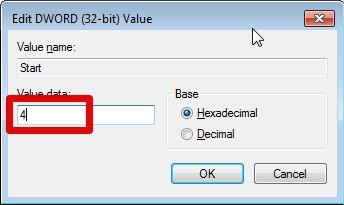
Now at the right side double click on START.


To block USB storage Medias, change the value data to 4.


If you want to unblock USB storage Medias just navigate to the same location and change th value data to 3.

that's all....make ur PC safe....more tricks to come....
Continue Reading | comments

15 Features Of VLC Player That You Probably Don’t Know About

VLC Player being the most celebrated open source media player is also ranked as the best among thousands of media players available out there.The latest version unleashed new horizons for controlling, managing, & customizing media files regardless of any format they belongs to. For novices, it come across as only a “Media Player” but the fact is, it empowers users with multitude of playback, recording, and streaming options. What makes it stand out is minimalistic & simple IDE, smooth playback, capacitating users with multiple file format support and much more. From the day VideoLAN dev team gushed forth VLC Player for the general public, we have seen a mass switch from other eminent media players.

Lets glance at the most overlooked features it offer.
Extravagant Video Effects

VLC include numerous aesthetic video effects, such as; Image adjustment, Transformation, Video cropping, Geometrical view & magnification, Video rotation, Color fun, and Image modification. You can access these video features through Extended Settings from main VLC IDE. Switching to Video Effects tab will show up these features in numerous tabs.

1) Basic Image Adjustments


VLC provides basic image adjustment options. Under Basic tab, you can play around with various color adjustments; Hue, Contrast, Brightness, Gamma, etc. On adjusting the color, you can view changes in realtime. Color adjustment options can also be very helpful especially when you are playing a video, having noise, glitches and lacks normal color pattern.

2) Video Sharpness effect
Apart from basic image adjustment options, there is another much demanded feature which will let you adjust video sharpness up to the acme of clarity. Under Basic tab, enable Sharpen option and adjust the sigma control as required. It will show you the changes in realtime so you can promptly adjust sharpness accordingly.

Scrutinize the wonderful sharp effect it produced in the video shown below.

3) Transforming to different angles
The Transform option allows you to rotate video by multiple degrees. Enabling Transform option would activate the video rotation feature. It offers rotation in 90,180, and 270 degrees. This comes useful if you have a video that you recorded via the camcorder in a different angle.


4) Video magnification/Zoom in & out
Another intriguing feature is Video Magnification. Under Geometry tab, enable Magnification/Zoom option, to let it zoom in/out the video. You will see a small window at top left corner with main magnification control. Fill in the triangle by clicking it to zoom into the video. To view the desired video portion, move the square capturing screen across the box.

 5) Video Rotation
With an excellent rotation feature, you can rotate the video in any direction. Enable Rotation option, and start moving the rotary control in circle.

6) Add a bit fun with Puzzle Game
The moment you hit Puzzle game option, it would turn the video into puzzling pieces. Enter number of columns & rows in which you need to solve out video puzzle. It divides the video into specified chunks on the screen.
 
Under Color fun tab, you can play around with colors, there is absolutely no list of colors to select from. You can write color code to introduce it in the video. Apart from this, through Color Extraction option, you can enter a specific color code to extract it from the video.

7) Panoramic view (Optimal for Muti-Screen)
Vout/Overlay is another superb feature, allowing video junkies to spread the video on the desktop wall in multiple windows. In this way, you can individually handle, manage and change the position of the video parts separated in windows. To make this effect look awesome, try it on a large HD TV or projector. On the left side enabling Add text option would add the text in each window.


8) Adding Logo
Overlaying logo option comes in handy, you can easily insert a logo (PNG/JPG format) in the video as a watermark. It also helps in overlaying existing logo with an image. To make use of this feature, under Logo tab, specify the full path of image where it is residing, adjust transparency control and allocate the position. The importance of this feature is that you can add the company logo while giving a video presentation.


9) Synchronization
Kudos to VLC for bringing up sync feature, those who haven’t used it yet, really missed out an important one. Under Synchronization tab, you can manually manage the A/V (Audio/video) sync and deal with them by adjusting the time. Most of the converted videos lacks A/V sync primarily because of change in FPS (Frames Per Second), this actually invokes the problem of either video or audio lagging behind. For adjusting the A/V sync problem, change the values in Advance of audio over video input pane, positive value refers to as video is lagging behind and conversely is the case with negative values which refers to as audio lagging behind.

Right beneath A/V sync settings, you will find Subtitles settings, to make subtitle properly sync with video, i.e, appears on right time. Adjust the timing in a way as defined in aforementioned criteria for A/V sync, positive values refers to subtitles showing up ahead of video. At the bottom, you can change subtitles speed. It may happen sometimes, on downloading subtitles from different source, or from different author, the speed (FPS) is not aligned with the video FPS, i.e, video running on different FPS and conversely subtitles FPS differs. To cope up with this problem, speeding of the subtitles option helps amazingly.

10) Record Webcam Video
Recording video from a webcam is another awesome feature VLC offers. It automatically populates the list of devices attached with your system. To record a video from the Webcam, under Media menu, click Capture Device. From Video device name, select the webcam device and click Play. It will turn on the webcam, from it’s main IDE, you can start recording the video instantly

11) Bookmarking media
Now this must be surprising to most users. Did you know that you can bookmark as well? VLC allow users to bookmark media files, whether you are playing it from local media, or streaming it from any remote location. You can instantly bookmark the media file and access it anytime later.


12) Advance Open File
Bluray DVD discs & rips comes with separate audio channels for giving the real effect of surrounded sound. Unlike others, VLC features Advance Open File option, which allows you to open a video file along with the separate audio file (if existed). You will find rip-less video synchronization with the external audio file ‘phenomenal’. Next time, you are planning on playing Bluray rip, take a whir of this feature.

13) Take Snapshots (PNG,JPG format supported)
As VLC offers instantaneous pause and allows playback in frames, as you can see here. You might need to take a snapshot of either specific frame or an instant paused frame. Guess what? VLC lets you take screenshots as well. You can capture a frame either by pausing the video, or while playbacking video frame-by-frame. To take snapshot more promptly assign a hotkey to snapshot feature from VLC Preferences. Otherwise from Video menu, click Snapshot to capture a screenshot of a frame.

14) Customize Interface 
There are so many features & functions VLC offers which makes it distinctive from others, Among those features, one is interface customization feature. Under View menu, you will find Customize Interface. It allows you to; change menus, buttons, add/delete buttons, change layout of main layout, and change playback controls positions as well.

inerface custom


15) Debug Logging
Want to know what went wrong with Video FPS, codecs you are using, why some feature is not compatible, or why you are encountering lagging and other relevant issues? VLC can tell you about any problem. With it’s intrinsic Debug logging feature, it can inform you about info like; lack of correspondence (in Network), video discrepancy, why feature is not supported or not compatible, which codec is missing, app crash, and erratic A/V halt due to unidentifiable reason. To view log, from View menu, under Add Interlace, click Debug logging.

Continue Reading | comments

Sport

Entertainment

World News

My Blog List

Test

Blog links

Categories

Followers

 
Support : Creating Website | Johny Template | Maskolis | Johny Portal | Johny Magazine | Johny News | Johny Demosite
Copyright © 2011. Knowledge Box - All Rights Reserved
Template Modify by Creating Website Inspired Wordpress Hack
Proudly powered by Blogger